MOVA Robot Vacuum Naming Guide: How to Decode the Lineup
S70 Roller, P10 Pro Ultra Gen 2, V50 Ultra Complete: here’s how I make sense of the letters, numbers and extra words.

If you’ve spent any time looking at MOVA robot vacuums, you’ve probably had the same thought I did: These names get complicated quickly.
S70 Roller. P10 Pro Ultra Gen 2. V50 Ultra Complete. Z60 Ultra Roller Complete. There’s useful information in there, but it helps to know which part of the name is telling you what.
The good news is that you don’t have to memorize every model to start making sense of the lineup. I find it easier to break each name into its pieces.
Start With the Four-Part Framework
MOVA’s own naming explanation separates the name into series, generation, feature level and station type. Think of those as clues to the model’s family, place in that family, enhanced features and dock. MOVA’s naming explanation.
Then there are extra terms such as Complete, Roller and Gen 2. They answer different questions, so I wouldn’t treat a longer name as an automatic sign of a better robot.
The Letter: Which Family Are You Looking At?
The series is the first thing I look at, but I don’t use it as a rigid ranking of every MOVA robot. My original guide described the families this way:
- S: A more accessible family that has expanded into newer cleaning designs.
- E: A focus on value and everyday cleaning.
- P: A broad performance lineup with plenty of variation between models.
- V: A family associated with flagship features.
- Z: A place for some of MOVA’s newer cleaning ideas.
Those are useful starting points, not a substitute for comparing the two actual models in front of you. New features can change what a series offers, and a newer model in one family may have something an older model in another family lacks.
That’s part of what makes the lineup interesting to follow — and why a single letter doesn’t finish the comparison.
The Number: Where Does It Fit in the Model Family?
MOVA describes the number as a generation marker. I find that helpful for organizing the names, but I wouldn’t compare a number in one family directly with a number in another and assume the larger one wins.
A P10 Pro Ultra Gen 2 is a good example of why the whole name matters. It keeps the P10 identifier while adding a separate version label.
“Pro”: Look for the Actual Upgrade
Pro signals an enhanced version relative to a base model. What I want to know next is what was enhanced.
Read the feature list for the specific pair you’re comparing. The word alone won’t tell you whether the change that matters to you is in cleaning hardware, controls or another part of the package.
“Ultra,” “Plus” and “Aqua”: Pay Attention to the Dock
In MOVA’s naming framework, Ultra combines automatic dust emptying with mop washing; Plus denotes dust emptying without mop washing; Aqua denotes mop washing without automatic dust emptying.
That distinction is useful because the dock affects how much work comes back to you. I’d check the exact station functions on the listing, including drying and water-handling features, rather than assume every dock sharing a label is identical.
Where Does MOBIUS Fit?
MOVA includes MOBIUS among its station types. I tend to think it deserves its own family because the MopSwap concept makes it stand out, but that’s my way of thinking about the product, not a change to MOVA’s official categories.
Keeping that distinction clear makes the naming guide easier to use without turning an opinion into a rule.
The Extra Words: Complete, Roller and Gen 2
Complete points you toward the accessory package. In my original guide, I highlighted extras such as replacement mops, filters and dust bags. Check the contents of the exact bundle rather than assuming the word means different robot hardware or a fixed quantity of spares.
Roller identifies the roller-mop design. That tells me something about the wet-cleaning system, but I still want to see how that particular model handles the floors I have.
Gen 2 identifies a revised version within a named model line. Make sure you’re reading the specifications and reviews for the version you intend to buy.
Put the Pieces Together
Here are the two examples I used to make the pattern easier to see:
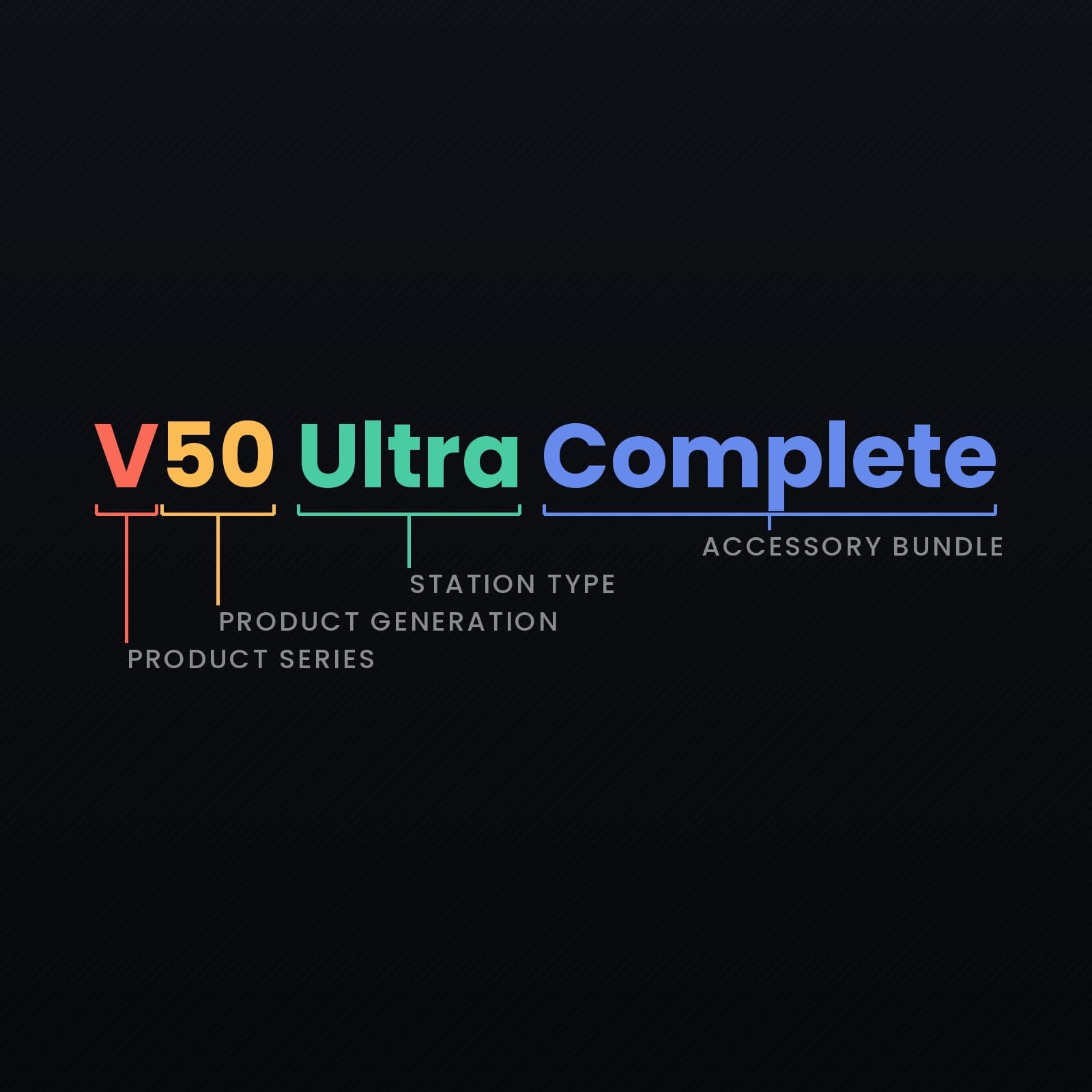
- V50 Ultra Complete: V family; 50 generation identifier; Ultra station designation; Complete accessory bundle.
- P10 Pro Ultra Gen 2: P family; 10 generation identifier; Pro feature level; Ultra station designation; Gen 2 version.
Once I separate those pieces, the names feel a lot less mysterious. The name gets me pointed in the right direction; the specifications and bundle contents tell me whether that particular robot makes sense for the home it’s going into.
And with MOVA continuing to try new mopping systems, docks and navigation ideas, I expect there will be plenty more names for us to decode.