VacuBots Guides Beta
Your Robot Questions. Answered Clearly.
How-to guides and maintenance help for robot vacuums, mowers and the other robots in your home.
-
How-To Guides
Step-by-step help for everyday jobs.
-
Setup
Get a new robot connected and running.
-
Maintenance
Keep brushes, filters and sensors working.
-
Clear Answers
Plain language, no marketing.
Eufy Cleaning Settings Explained
Choose a cleaning mode, adjust the available controls and find a useful starting point for your floors.
Ecovacs Deebot Cleaning Settings Explained
Choose a cleaning mode, adjust the available controls and find a useful starting point for your floors.
Dyson Cleaning Settings Explained
Choose a cleaning mode, adjust the available controls and find a useful starting point for your floors.
Dreame Cleaning Settings Explained
Choose a cleaning mode, adjust the available controls and find a useful starting point for your floors.

How to Create and Edit Your Dreame Map
Save your home’s layout, correct room boundaries and set useful cleaning exclusions.

How to Create and Edit Your Dyson Map
Save your home’s layout, correct room boundaries and set useful cleaning exclusions.

How to Create and Edit Your Ecovacs Deebot Map
Save your home’s layout, correct room boundaries and set useful cleaning exclusions.

How to Create and Edit Your Eufy Map
Save your home’s layout, correct room boundaries and set useful cleaning exclusions.

How to Create and Edit Your Matic Map
Rename rooms, correct boundaries and make Matic’s layout more useful for everyday cleaning.

How to Create and Edit Your Mova Map
Save your home’s layout, correct room boundaries and set useful cleaning exclusions.

How to Create and Edit Your Narwal Map
Save your home’s layout, correct room boundaries and set useful cleaning exclusions.
How to Create and Edit Your Roomba Map
Save your home’s layout, correct room boundaries and set useful cleaning exclusions.
How to Set Up Dreame Cleaning Schedules and Saved Tasks
Plan regular cleanups and make your favorite room-cleaning jobs easier to repeat.
How to Set Up Dyson Cleaning Schedules and Saved Tasks
Plan regular cleanups and make your favorite room-cleaning jobs easier to repeat.
How to Set Up Ecovacs Deebot Cleaning Schedules and Saved Tasks
Plan regular cleanups and make your favorite room-cleaning jobs easier to repeat.
How to Set Up Eufy Cleaning Schedules and Saved Tasks
Plan regular cleanups and make your favorite room-cleaning jobs easier to repeat.
How to Set Up Matic Cleaning Schedules
Plan room and area cleanups around the times your home needs them.
How to Set Up Mova Cleaning Schedules and Saved Tasks
Plan regular cleanups and make your favorite room-cleaning jobs easier to repeat.
How to Set Up Narwal Cleaning Schedules and Saved Tasks
Plan regular cleanups and make your favorite room-cleaning jobs easier to repeat.
How to Set Up Roomba Cleaning Schedules and Saved Tasks
Plan regular cleanups and make your favorite room-cleaning jobs easier to repeat.
How to Use Matic on Multiple Floors
Add another layout, check the active map and plan for charging on each level.

How to Use Your Dreame on Multiple Floors
Create separate layouts and plan for cleaning away from the robot’s station.

How to Use Your Dyson on Multiple Floors
Create separate layouts and plan for cleaning away from the robot’s station.
How to Use Your Ecovacs Deebot on Multiple Floors
Create separate layouts and plan for cleaning away from the robot’s station.
How to Use Your Eufy on Multiple Floors
Create separate layouts and plan for cleaning away from the robot’s station.
How to Use Your Mova on Multiple Floors
Create separate layouts and plan for cleaning away from the robot’s station.
How to Use Your Narwal on Multiple Floors
Create separate layouts and plan for cleaning away from the robot’s station.
How to Use Your Roomba on Multiple Floors
Create separate layouts and plan for cleaning away from the robot’s station.
Matic Cleaning Settings Explained
Choose the right task, review floor types and use the cleaning options actually offered in the Matic app.
Mova Cleaning Settings Explained
Choose a cleaning mode, adjust the available controls and find a useful starting point for your floors.
Narwal Cleaning Settings Explained
Choose a cleaning mode, adjust the available controls and find a useful starting point for your floors.
Roomba Cleaning Settings Explained
Choose a cleaning mode, adjust the available controls and find a useful starting point for your floors.

How to Create and Edit Your Roborock Map
Map your home, correct room divisions and add cleaning boundaries in the Roborock app.
Roborock Cleaning Settings Explained: Suction, Mopping and Cleaning Passes
Understand the main controls in the Roborock app and choose settings that suit your floors.
How to Set Up Roborock Cleaning Schedules and Routines
Schedule regular cleanups and save favorite tasks for quick access in the Roborock app.
How to Use Your Roborock on Multiple Floors
Save separate maps and clean another level without moving your dock for every run.

How to Connect Your Narwal Robot Vacuum to Google Home
Link your robot’s account, confirm the connection and check which cleaning controls are available.

How to Connect Your Narwal Robot Vacuum to Amazon Alexa
Link your robot’s account, confirm the connection and check which cleaning controls are available.

How to Connect Your Mova Robot Vacuum to Google Home
Link your robot’s account, confirm the connection and check which cleaning controls are available.

How to Connect Your Mova Robot Vacuum to Amazon Alexa
Link your robot’s account, confirm the connection and check which cleaning controls are available.

How to Connect Your Eufy Robot Vacuum to Google Home
Link your robot’s account, confirm the connection and check which cleaning controls are available.

How to Connect Your Eufy Robot Vacuum to Amazon Alexa
Link your robot’s account, confirm the connection and check which cleaning controls are available.

How to Connect Your Ecovacs Deebot Robot Vacuum to Google Home
Link your robot’s account, confirm the connection and check which cleaning controls are available.

How to Connect Your Ecovacs Deebot Robot Vacuum to Amazon Alexa
Link your robot’s account, confirm the connection and check which cleaning controls are available.

How to Connect Your Dyson Robot Vacuum to Google Home
Link your robot’s account, confirm the connection and check which cleaning controls are available.

How to Connect Your Dyson Robot Vacuum to Amazon Alexa
Link your robot’s account, confirm the connection and check which cleaning controls are available.

How to Connect Your Dreame Robot Vacuum to Google Home
Link your robot’s account, confirm the connection and check which cleaning controls are available.

How to Connect Your Dreame Robot Vacuum to Amazon Alexa
Link your robot’s account, confirm the connection and check which cleaning controls are available.

How to Connect Matic to Google Home
Use Matic’s smart-home pairing controls and check the basic functions Google Home exposes.

Can You Connect Matic to Alexa? What Owners Should Know
Matic lists Alexa support as coming soon, so owners should not expect a working Alexa setup process yet.

How to Connect Your Roborock Robot Vacuum to Amazon Alexa
Link your robot’s account, confirm the connection and check which cleaning controls are available.
How to Connect Your Roborock Robot Vacuum to Google Home
Link your robot’s account, confirm the connection and check which cleaning controls are available.
How to Connect Your Roomba to Amazon Alexa
Link your robot’s account, confirm the connection and check which cleaning controls are available.
How to Connect Your Roomba to Google Home
Link your robot’s account, confirm the connection and check which cleaning controls are available.
How to Connect Your Roborock Robot Vacuum to Apple Home
Learn how to connect your Roborock robot vacuum to Apple Home using Matter, control cleaning with Siri and understand which features are supported.
How to Use Roborock's "Hello, Rocky" Voice Commands
Learn how to use Roborock's Hello Rocky voice assistant, including cleaning commands, supported models, room cleaning, Clean Here and dock maintenance.
How to Clean Your Roomba Robot Vacuum and Dock
A simple care routine for the brushes, filter, mop and station that keep your robot cleaning.
How to Clean Your Narwal Robot Vacuum and Dock
A simple care routine for the brushes, filter, mop and station that keep your robot cleaning.
How to Clean Your Mova Robot Vacuum and Dock
A simple care routine for the brushes, filter, mop and station that keep your robot cleaning.
How to Clean Your Matic Robot Vacuum and Charging Dock
Care for Matic’s brush roll, mop system, cameras and charging contacts without treating it like an auto-empty robot.
How to Clean Your Eufy Robot Vacuum and Dock
A simple care routine for the brushes, filter, mop and station that keep your robot cleaning.
How to Clean Your Ecovacs Deebot Robot Vacuum and Dock
A simple care routine for the brushes, filter, mop and station that keep your robot cleaning.
How to Clean Your Dyson Robot Vacuum and Dock
A simple care routine for the brushes, filter, mop and station that keep your robot cleaning.

How to Clean Your Dreame Robot Vacuum and Dock
A simple care routine for the brushes, filter, mop and station that keep your robot cleaning.

When to Replace Dreame Brushes, Filters, Mops and Dust Supplies
Use wear, maintenance prompts and the correct compatibility listing when buying replacement parts.

When to Replace Dyson Brushes, Filters, Mops and Dust Supplies
Use wear, maintenance prompts and the correct compatibility listing when buying replacement parts.

When to Replace Ecovacs Deebot Brushes, Filters, Mops and Dust Supplies
Use wear, maintenance prompts and the correct compatibility listing when buying replacement parts.

When to Replace Eufy Brushes, Filters, Mops and Dust Supplies
Use wear, maintenance prompts and the correct compatibility listing when buying replacement parts.

When to Replace Matic’s HEPA Bag, Brush Roll and Mop Roll
Use Matic’s alerts, visible wear and model-specific guidance to keep replacement decisions simple.

When to Replace Mova Brushes, Filters, Mops and Dust Supplies
Use wear, maintenance prompts and the correct compatibility listing when buying replacement parts.
When to Replace Narwal Brushes, Filters, Mops and Dust Supplies
Use wear, maintenance prompts and the correct compatibility listing when buying replacement parts.
When to Replace Roomba Brushes, Filters, Mops and Dust Supplies
Use wear, maintenance prompts and the correct compatibility listing when buying replacement parts.

When to Replace Roborock Brushes, Filters, Mops and Dust Bags
Know what to inspect, when cleaning is enough and how to choose replacement parts for your robot.
How to Clean Your Roborock Robot Vacuum and Dock
Keep your Roborock running well with a simple cleaning routine for its brushes, filter, sensors, mop and dock.
Eufy Won’t Connect to Wi-Fi or Shows Offline? Here’s What to Do
Check power, app setup and network settings before resetting your robot.

Eufy Not Picking Up Dirt? Here’s What to Check
Work through the mode, bin, filter and brushes when dry debris stays on the floor.
Eufy Not Emptying, Washing or Drying? How to Check the Dock
Separate a collection problem from a water or drying problem before repeating maintenance cycles.
Ecovacs Deebot Won’t Connect to Wi-Fi or Shows Offline? Here’s What to Do
Check power, app setup and network settings before resetting your robot.

Ecovacs Deebot Not Picking Up Dirt? Here’s What to Check
Work through the mode, bin, filter and brushes when dry debris stays on the floor.
Ecovacs Deebot Not Emptying, Washing or Drying? How to Check the Dock
Separate a collection problem from a water or drying problem before repeating maintenance cycles.
Dyson Won’t Connect to Wi-Fi or Shows Offline? Here’s What to Do
Check power, app setup and network settings before resetting your robot.

Dyson Not Picking Up Dirt? Here’s What to Check
Work through the mode, bin, filter and brushes when dry debris stays on the floor.

Dyson Not Emptying, Washing or Drying? How to Check the Dock
Separate a collection problem from a water or drying problem before repeating maintenance cycles.

Dreame Won’t Connect to Wi-Fi or Shows Offline? Here’s What to Do
Check power, app setup and network settings before resetting your robot.

Dreame Not Picking Up Dirt? Here’s What to Check
Work through the mode, bin, filter and brushes when dry debris stays on the floor.

Dreame Not Emptying, Washing or Drying? How to Check the Dock
Separate a collection problem from a water or drying problem before repeating maintenance cycles.

How to Keep Your Dreame Mop and Dock From Smelling
Find the source of an odor and clean the parts that retain wastewater or residue.

How to Keep Your Dyson Mop and Dock From Smelling
Find the source of an odor and clean the parts that retain wastewater or residue.
How to Keep Your Ecovacs Deebot Mop and Dock From Smelling
Find the source of an odor and clean the parts that retain wastewater or residue.
How to Keep Your Eufy Mop and Dock From Smelling
Find the source of an odor and clean the parts that retain wastewater or residue.
How to Keep Your Matic Mop and Waste System From Smelling
Check the HEPA bag, mop roll, cavity and wringer when an odor develops.
How to Keep Your Mova Mop and Dock From Smelling
Find the source of an odor and clean the parts that retain wastewater or residue.
How to Keep Your Narwal Mop and Dock From Smelling
Find the source of an odor and clean the parts that retain wastewater or residue.
How to Keep Your Roomba Mop and Dock From Smelling
Find the source of an odor and clean the parts that retain wastewater or residue.
Matic Not Charging? How to Check the Robot and Dock
Inspect dock power, charging contacts and the status light before seeking service.

Matic Not Picking Up Dirt? Here’s What to Check
Inspect the HEPA bag, brush roll and cleaning path before changing your routine.
Matic Won’t Connect to Wi-Fi? How to Reconnect It
Check Matic’s power and local connection, then follow its reboot and pairing steps.

Mova Not Emptying, Washing or Drying? How to Check the Dock
Separate a collection problem from a water or drying problem before repeating maintenance cycles.

Mova Not Picking Up Dirt? Here’s What to Check
Work through the mode, bin, filter and brushes when dry debris stays on the floor.
Mova Won’t Connect to Wi-Fi or Shows Offline? Here’s What to Do
Check power, app setup and network settings before resetting your robot.
Narwal Not Emptying, Washing or Drying? How to Check the Dock
Separate a collection problem from a water or drying problem before repeating maintenance cycles.

Narwal Not Picking Up Dirt? Here’s What to Check
Work through the mode, bin, filter and brushes when dry debris stays on the floor.
Narwal Won’t Connect to Wi-Fi or Shows Offline? Here’s What to Do
Check power, app setup and network settings before resetting your robot.
Roomba Not Emptying, Washing or Drying? How to Check the Dock
Separate a collection problem from a water or drying problem before repeating maintenance cycles.
Roomba Not Picking Up Dirt? Here’s What to Check
Work through the mode, bin, filter and brushes when dry debris stays on the floor.
Roomba Won’t Connect to Wi-Fi or Shows Offline? Here’s What to Do
Check power, app setup and network settings before resetting your robot.
How to Keep Your Roborock Mop and Dock From Smelling
Clean the places that hold dirty water and help the mop dry between cleaning runs.
Roborock Not Emptying, Washing or Drying? How to Troubleshoot the Dock
Check app settings, water tanks and removable dock parts when an automatic maintenance task stops working.

Roborock Not Picking Up Dirt? Here's What to Check
Work through the dustbin, filter, brushes and cleaning settings when your Roborock leaves debris behind.
Roborock Won't Connect to Wi-Fi or Shows Offline? Here's What to Do
Troubleshoot pairing problems, lost connections and router changes in the Roborock app.
Dreame X60 Max Ultra Complete Maintenance Check
How to clean and maintain the Dreame X60 Max Ultra Complete: brushes, tanks, sensors and dock, plus when to replace worn parts.
Maintenance Check: MOVA Z60 Ultra Roller Complete
MOVA Z60 Ultra Roller Complete at a Glance * Suction Power: 28,000 Pa * Mopping System: HydroForce continuously washed roller mop, 12 spray
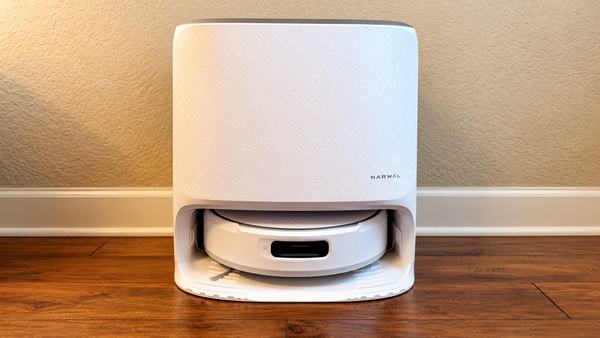
Maintenance Check: Freo 20
A complete Narwal Freo 20 maintenance guide, organized by how often each task needs doing, from daily roller checks to monthly filter and sensor care.
How to Connect and Use Your Eufy Omni S2 With Apple Home
The Eufy Omni S2 supports Matter, allowing owners to connect the robot vacuum to Apple Home for cleaning controls, Siri voice commands
How to Connect Your Narwal Robot Vacuum to Apple Home
Learn how to connect your Narwal robot vacuum to Apple Home using Matter, control cleaning with Siri and understand which features are supported.
How to Connect Your ECOVACS Robot Vacuum to Apple Home
Learn how to connect your ECOVACS robot vacuum to Apple Home using Matter, control cleaning with Siri and understand which features are supported.
How to Connect Your Dreame Robot Vacuum to Apple Home
Learn how to connect your Dreame robot vacuum to Apple Home using Matter, control cleaning with Siri and understand which features are supported.
How to Use Narwal's "Hey, Nawa" Voice Assistant and Commands
Learn how to use Narwal's Hey Nawa voice assistant, including cleaning commands, compatible models, setup, room cleaning and NarGPT features.
How to Use Dreame's "OK, Dreame" Voice Assistant and Supported Commands
Learn how to use Dreame's built-in voice assistant, including supported models, cleaning commands, room selection, voice-directed cleanups and setup.
How to Use Ecovacs' "OK, YIKO" Voice Assistant and Its AI Agent Features
Learn how to use Ecovacs' YIKO voice assistant, including cleaning commands, compatible Deebot models, setup and AGENT YIKO cleaning preferences.
How to Use MOVA's 'Hey, MOVA' Built-In Voice Assistant to Control Your Robot Vacuum
Learn how to use MOVA's built-in voice assistant, including supported models, cleaning commands, room selection, voice-directed cleanup and dock maintenance.
MOVA Robot Vacuum Naming Guide: How to Decode the Lineup
S70 Roller, P10 Pro Ultra Gen 2, V50 Ultra Complete: here’s how I make sense of the letters, numbers and extra words.
LiDAX Ultra: Modifying a Zone
A small boundary change can mean less trimming. Getting there is easier once you understand the map’s restrictions.
LiDAX Ultra: Explaining UltraTrim 2.0
The moving deck is a clever idea. Its fixed trimming height was the part I wanted owners to understand.
MOVA Z60 Ultra Complete: How Low Can It Go?
Pet hair finds its way under just about everything. Here’s how the Z60’s retractable lidar helped me reach it.
MOVA Z60 Ultra Complete: Can It Really Handle a House Full of Hair?
A closer look at a heavy-hair cleanup, from pickup on the floor to the bin and dock.
A Clean Robot Is a Robot That Lasts: How I Maintain My MOVA Z60 Ultra Complete
A little attention to the brushes, mop housing and dock helps keep up with a household that creates plenty of mess.

MOVA Z60 Ultra Complete StepMaster 2.0 Put to the Test!
I put a roughly 1.5-inch board across a doorway to see how the Z60 would handle the climb — and the trip back.

Z60 Ultra Complete Mopping Test: Is It a Good Fit for a Muddy Home With Pets?
We tracked dirt in for a day, let it dry overnight and gave the roller mop some real household work.
Z60 Ultra Complete vs. Wet Spills: Who Wins?
A wet bathroom floor gave me a chance to try this handy mode — and watch what happened on the return to the dock.
MOVA Z60 Ultra Complete Setting Guide: How to Get the Most Out of Your New Robot
The settings I use to tackle shedding, reach corners and keep the mop ready for another busy day.

Unboxing the MOVA Z60 Ultra Complete!
My first look at the robot, dock and generous supply of spare parts in the tested Complete package.
My Z60 Pro Tip: Brushes Are Removable!
A small detail that made a big difference when I wanted to reach trapped hair in the Z60's main brush assembly.
No guides match that. Try another word, or clear the maker.